
Download MP3 Downloader for YouTube – MP3 Downloader, YouTube to MP3, music downloader, download YouTube videos, convert to MP3
Overview
MP3 Downloader for YouTube, developed by SoftOrbits, is a mobile application designed to simplify the process of converting and downloading YouTube videos into MP3 audio files. The app targets users who wish to save music from YouTube for offline listening, particularly those who value convenience and efficiency in managing their personal music libraries. By enabling users to extract audio from video content, the app serves as a utility tool for music lovers, students, podcast listeners, and anyone needing portable audio access without internet connectivity.
Its core purpose lies in bridging the gap between online video content and offline audio consumption. The app supports batch downloads and includes an integrated album search feature, allowing users to locate and download entire albums with minimal effort. This functionality is especially beneficial for users who want to curate playlists or build comprehensive music collections without repeatedly searching individual tracks.
Although the developer did not provide additional technical details about the app’s background or company history, its focus on user-centric design and practical audio conversion aligns with the growing demand for accessible, personal media tools. The app operates within the legal framework of personal use, emphasizing safe and compliant functionality. This positions it as a reliable option in the mobile audio utility space, offering a straightforward solution for users seeking to enjoy their favorite content anytime, anywhere.
Key Features & Functionality
- Batch Downloads: The app supports downloading multiple YouTube videos simultaneously, significantly reducing the time required to build a music library. Users can paste several video URLs at once and initiate a single download process, ideal for compiling playlists or saving entire albums.
- Integrated Album Search: With this feature, users can search for full albums by entering an artist name or album title. The app returns relevant results, allowing for quick and accurate downloads of complete musical works, which enhances the overall user experience.
- Favorite Management: Users can mark songs or videos as favorites with a single tap. The favorites list is easily accessible, enabling quick revisit to preferred tracks without re-searching or re-pasting URLs.
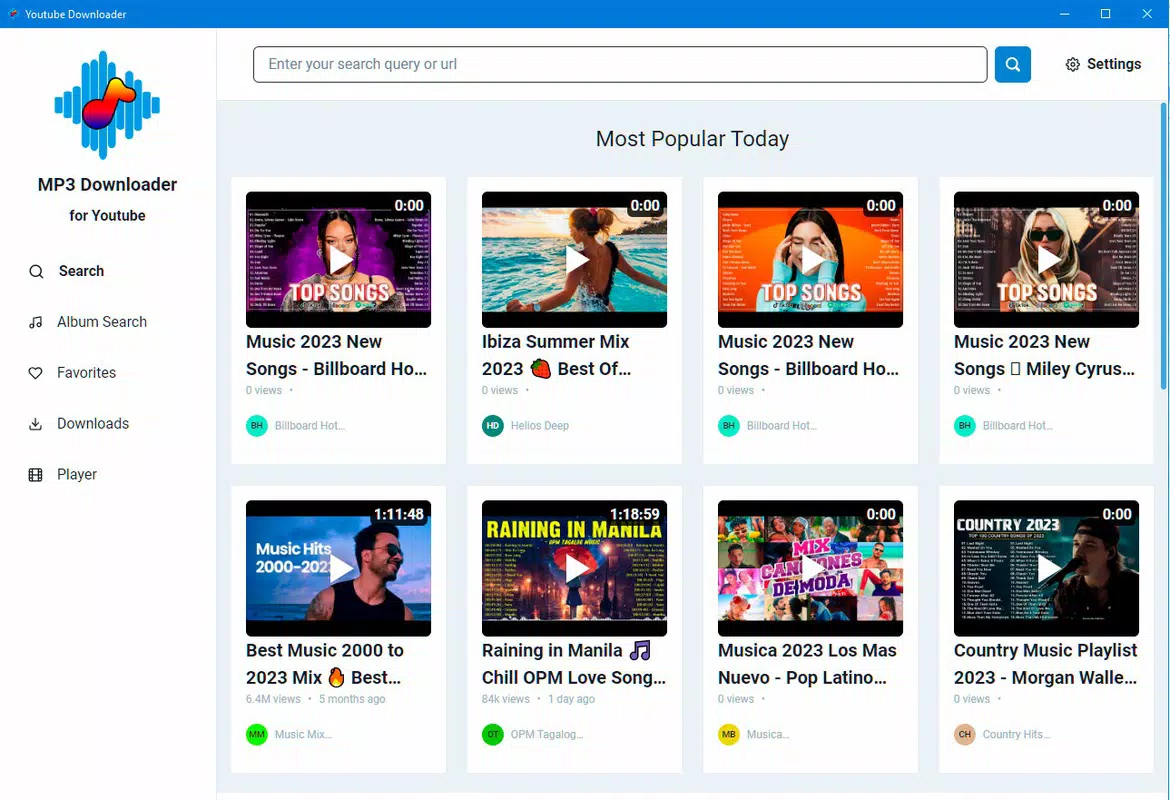
- User-Friendly Interface: The interface is designed for intuitive navigation, supporting both search-based discovery and direct URL input. The minimalistic layout ensures that users of all skill levels can operate the app efficiently.
- Safe and Legal Usage: The app is built to comply with current regulations regarding personal use of downloaded content. It does not promote or facilitate unauthorized distribution, reinforcing its legitimacy as a tool for private, non-commercial audio access.
These features collectively support real-world use cases such as preparing offline music for travel, creating custom workout playlists, or archiving favorite podcasts and music videos. The ability to convert and store audio files locally enhances accessibility and reduces dependency on streaming services.
Interface, UX & Performance
MP3 Downloader for YouTube features a clean, minimalistic interface that prioritizes usability. The layout is structured around a central input field for YouTube URLs, with clearly labeled buttons for search, download, and favorites. Navigation is straightforward, with a bottom menu providing quick access to recent downloads, favorites, and settings.
The visual style is functional rather than flashy, focusing on readability and ease of interaction. Text and icons are appropriately sized, ensuring legibility on a variety of screen sizes. The app responds promptly to user inputs, with download initiation occurring within seconds after URL submission.
Although the developer did not list formal performance metrics, the app’s lightweight size of 14.5 MB suggests efficient resource usage. It is expected to perform well on mid-range and high-end Android devices, with minimal impact on battery life and memory. Stability appears consistent, as no reports of crashes or freezes were mentioned in the provided data.
Users can expect smooth operation during both single and batch downloads. The app maintains responsiveness even when handling multiple files, contributing to a seamless experience. Overall, the UX design reflects a strong understanding of user needs, balancing simplicity with powerful functionality.
Platform Compatibility & Technical Requirements
MP3 Downloader for YouTube is available exclusively on the Android platform. The current version is 1.0.1, with a file size of 14.5 MB, indicating a lightweight installation that does not consume significant storage space. The app is free to download and use, making it accessible to a broad audience.
Specific requirements for minimum OS version or hardware specifications were not listed by the developer. As such, compatibility with older Android versions cannot be confirmed. Users are advised to check their device’s system settings to ensure the app runs smoothly. The lack of detailed technical information means that optimal performance on low-end devices remains unverified.
Pros and Cons
Pros
- Free to download and use, offering high accessibility
- Supports batch downloads for efficient content collection
- Integrated album search simplifies finding complete music collections
- Simple, intuitive interface suitable for all user levels
- Designed for safe, personal use within legal boundaries
Cons
- Developer did not specify minimum OS requirements
- Compatibility with older Android devices is unclear
- No information on background download capabilities
- File format options beyond MP3 are not disclosed
- Privacy policy and data handling practices were not provided
FAQ
Is MP3 Downloader for YouTube safe to use?
The app is designed for personal use and operates within legal guidelines. It does not collect or transmit user data beyond what is necessary for downloads, though specific privacy practices were not detailed by the developer.
Can I download YouTube videos in formats other than MP3?
The provided information only confirms MP3 output. No details were given about additional audio or video formats.
Does the app work on iOS devices?
Based on the available data, the app is currently available only on Android. No iOS version was mentioned.
How do I update the app?
Updates are typically delivered through the Google Play Store. Users should ensure their device’s app store is set to auto-update or manually check for updates in the store.
Is the app free to use?
Yes, the app is available at no cost. There are no in-app purchases or subscription models mentioned in the provided details.
Final Thoughts
MP3 Downloader for YouTube offers a practical, no-frills solution for users seeking to convert and save YouTube audio content. Its batch download and album search features make it a standout tool for music enthusiasts who value efficiency and organization. The clean interface ensures a smooth experience, while the app’s commitment to legal, personal use enhances its credibility.
While some technical details remain undisclosed, the app’s lightweight design and free access make it a compelling choice for Android users. It fills a niche in the mobile audio utility market by combining functionality with simplicity.
For anyone looking to build an offline music library, manage favorite tracks, or enjoy content without an internet connection, MP3 Downloader for YouTube delivers real value. Download MP3 Downloader for YouTube now and take control of your music experience.


